
Get Making Tax Digital for VAT Sorted Today
!Easy MTD is HMRC-recognised bridging software designed for businesses and agents who want to get their VAT right. It allows users to view VAT obligations, liabilities, payments and penalties, and submit VAT returns to HMRC in compliance with Making Tax Digital (MTD) for VAT.
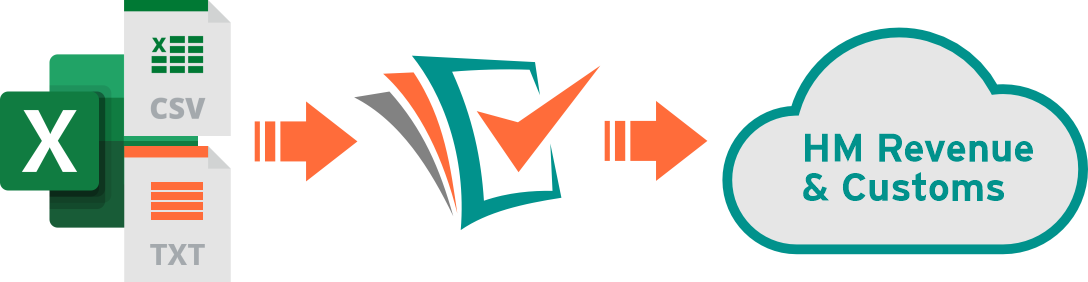
VAT figures stored in Excel, text, or CSV files can be imported and submitted quickly and securely using !Easy MTD. Therefore, if you rely on spreadsheets or non-compliant software, its not necessary to change your record keeping process or pay for a costly, complex accounting package.
Viewing VAT obligations, liabilities, payments and penalties is free, while submitting a VAT return costs from as little as £2+VAT. New sign-ups receive a free token so the first VAT return can be submitted at no cost.
What is Making Tax Digital for VAT?
Making Tax Digital (MTD) for VAT is a HMRC service designed to modernise how businesses manage and submit VAT. Under MTD for VAT rules, business records must be kept digitally and HMRC's online VAT submission service can no longer be used (unless you're exempt).
If you maintain your business records and calculate your VAT figures in Excel, Google Sheets, OpenOffice Calc or any other spreadsheet, or if you use accounting software that isn't compatible with MTD for VAT, you will need bridging software such as !Easy MTD to submit your VAT returns.
When Does It Start?
MTD for VAT was launched by HMRC in April 2019 and all existing and newly VAT registered businesses must use it (unless exempt).
How Do I Comply?
You must use MTD for VAT compliant software such as !Easy MTD to submit VAT returns to HMRC - making sure to digitally record and link your figures.
What Figures Do I Digitally Record and Link?
The 9 VAT figures that make up a VAT return must be recorded in a spreadsheet, text or CSV file, and must be digitally linked to the sales and purchase figures used to calculate them.
How Do I Get Going?
Start or continue recording your sales and purchase transactions in a spreadsheet, and download, install and configure !Easy MTD. You can then submit a VAT return to HMRC. No accounting software required!
Why Choose !Easy MTD
Just some of the reasons why you should choose !Easy MTD as your Making Tax Digital (MTD) for VAT solution.
HMRC-Recognised
!Easy MTD is 100% compliant with MTD for VAT, and is listed on HMRC's "Find Software" web page. When you file your VAT with Easy MTD you are adhering to HMRC rules.
Any Spreadsheet
!Easy MTD can be used with your existing spreadsheets - it does not require a special template or layout, and you defintely don't need expensive accounting software.
Simple to Use
Filing VAT has never been so simple - select your spreadsheet, specify where the VAT figures are located and click the Submit button - sorted! Its even easier for nil/zero VAT returns.
Automated VAT Figures
If necessary, your VAT figures are correctly rounded, converted to whole numbers, calculated or assumed to be zero so they conform with HMRC rules.
Use With Any Scheme
As long as your Excel, text or CSV file contains the 9 VAT figures required by HMRC, you can use !Easy MTD to submit your VAT return no matter what VAT scheme you use.
Installed Software
!Easy MTD isn't Cloud software and it certainly isn't an Excel plug-in. Instead, !Easy MTD is installed on your computer or laptop so you can keep your own or your client's VAT figures in-house and secure.
Tried and Tested
The forerunner of !Easy MTD - Easy MTD VAT - has been used to submit over 133K VAT returns for over 17K businesses. You're in safe, trusted hands when using !Easy MTD.
Suitable for Everyone
Whether you’re submitting VAT returns for your own business or you're an agent submitting on behalf of your clients, !Easy MTD gets the job done quickly and securely.
Need a Spreadsheet?
Excel spreadsheets for recording your business sales and purchase transactions, and calculating the VAT figures required by HMRC.*
Find Out More*Unlike many other Making Tax Digital for VAT bridging solutions, you can use any Excel spreadsheet with !Easy MTD. You do not require a special template and you can carry on using your own spreadsheet without change.
All You Need to Get Making Tax Digital Sorted
!Easy MTD provides all the tools you need to comply with Making Tax Digital for VAT

View Obligations
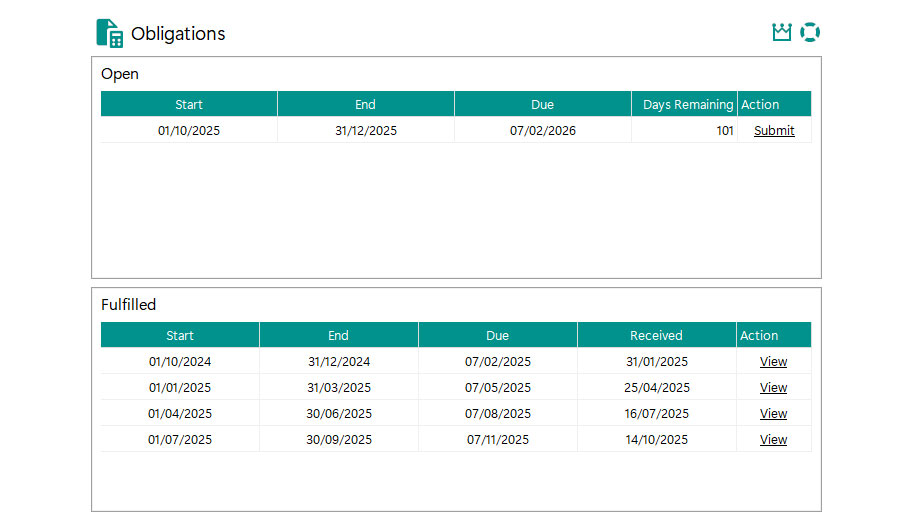
View your open and fulfilled VAT obligations, begin the submission process or view a VAT return.

Submit a VAT Return
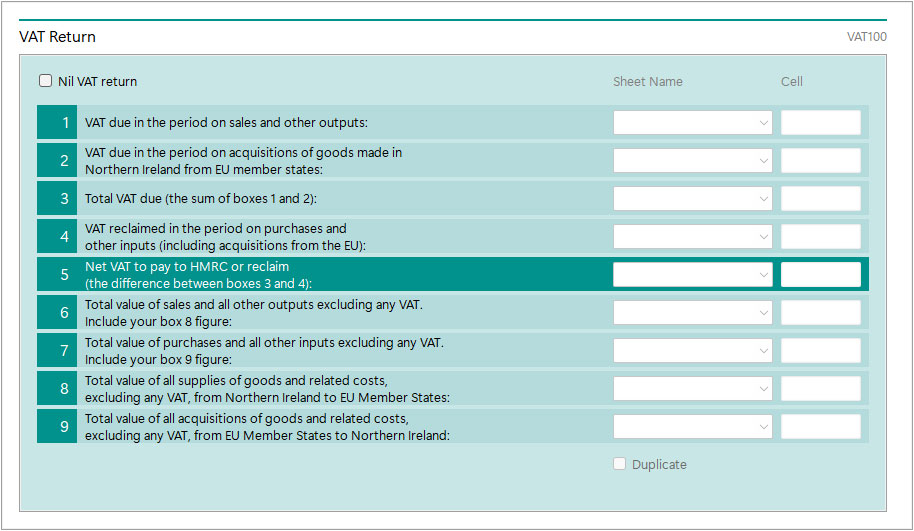
Select your spreadsheet, text or CSV file, specify where the 9 VAT figures appear and submit them to HMRC.
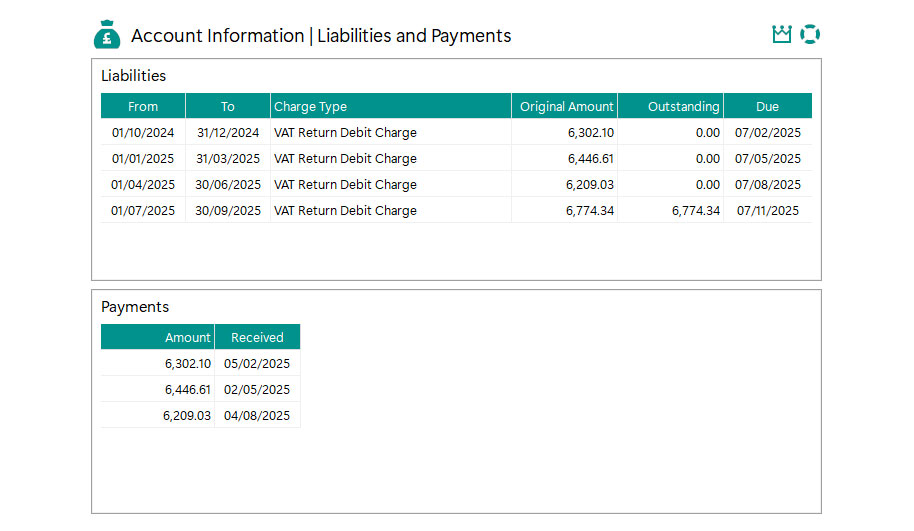

View Liabilities, Payments and Penalties
Stay informed about the VAT information held by HMRC without leaving !Easy MTD.
Try For Free
Sign up for an Easy MTD account and you'll receive a complimentary token that will allow you to submit your first VAT return for free*
Sign Up*Only available for new sign-ups, and only one free token per business or agent. Fly Software reserve the right to remove free tokens from ineligible accounts.
How !Easy MTD Works

Download, Install and Configure
Download the !Easy MTD setup file, install it, add a business and connect with HMRC.

Retrieve Obligations
View the open and fulfilled VAT obligations HMRC hold for the business you added to !Easy MTD.

Submit a VAT Return
Select an open obligation and a figures file, and submit the 9 VAT figures to HMRC.

Review VAT Information
Conveniently review the VAT liabilities, payments and penalties without needing to sign in to HMRC.
VAT Returns Submitted
Last VAT Submission
Businesses Serviced
Next Steps
If you're wondering what to do next with Making Tax Digital for VAT, take a look at the following to kick start your journey:
Sign Up
You'll need an !Easy MTD account before you can submit a VAT return to HMRC using !Easy MTD. Sign up here today and we'll gift you a token.
Download
!Easy MTD isn't Cloud software, so you'll need to download and install it. It works with Windows 11, 10, 8 and 7 so if you're using one of these you're good to go.
Buy Tokens
You'll need a token to submit a VAT return - one token per submission. If you've used your free token or you weren't eligible, you'll need to buy one or more.
Support
There's a wealth of information at your fingertips to get you up and running with !Easy MTD. Help, guides, videos and a knowledge base - we've got the lot and an AI helper.
Contact us if you have a question or are still unsure about what to do.